- Home
- /
- Qlik Cloud September 2025: what’s new
 Reading time: 10 min
Welcome to the Qlik September Product Release Highlights. This month’s update delivers exciting new capabilities across Qlik Cloud, Qlik Sense, and Qlik Automate — empowering users, developers, and admins to do even more with their data.
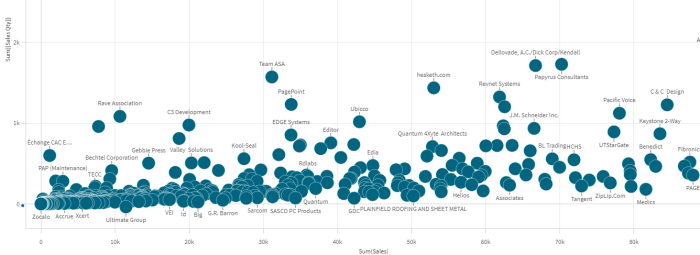
Shapes for the line chart was a great success, such a neat way to add context and literacy to your dashboards. Shapes are now also available for the bar, combo and the scatter plot. In the scatter plot you can specify areas as well. Perfect for your Gartner magic quadrants!
Qlik has released two quality of life improvements. In the sheets overview and the sheet section it’s now possible to publish or unpublish a sheet by dragging the sheet in to the other section. Also the current expand state of the view is kept until the user decides to change it.
A new scope in Qlik Cloud now gives administrators full control over permissions related to the Direct Access gateway.
The scope is divided in two areas.
You’ve been using the App Performance Evaluation tool to measure and compare how your apps perform—but now it works with Large Apps too!
As your apps grow, so does the importance of knowing what’s happening inside them. With this new capability, developers can pinpoint performance bottlenecks in charts, sheets, and KPIs—even in the biggest apps—so they can deliver the fastest, smoothest experience possible.
Evaluations on Large Apps consume Large App reload capacity—ensuring there’s no impact on users actively working with those apps. You can run evaluations directly from the activity center, through Qlik Automate, or via the Qlik Cloud APIs.
With multi-template report tasks, report developers can configure tasks with multiple report outputs whether embedding an HTML report with an attachment, or simply attaching multiple reports to the same email.
Video – Creating a multi-template report task
The current column is now highlighted in data asset panel of the straight table. Improves usability, makes easier to work with the table.
It is now possible to use all charts when embedding a dynamic view inside a Direct Queryapplication. Enhance your SQL push down solution with advanced visualizations and calculations.
The September release introduces new capabilities that make migration planning and execution more flexible, efficient, and aligned with dependencies.
Features
Other improvements
Qlik Analytics Migration Tool overview
Note: Not supported in Qlik Cloud Government. Not supported in Qlik Cloud Government – DoD.
ML Experiments, ML Deployments and Run Real Time Predictions are now available as custom permissions for custom roles and user defaults.
Available Qlik Predict permissions in the User Default and custom roles
Note: Not supported in Qlik Cloud Government. Not supported in Qlik Cloud Government – DoD.
Qlik Cloud’s search now makes it easier to find applications by name or description using natural language. Just describe what you’re looking for and we’ll understand the meaning and find it. Even in multiple languages!

Direct Access gateway 1.7.7 introduces both new and enhanced features, and resolves several issues. For upgrade instructions and a list of resolved issues, see Upgrading the Direct Access gateway installation
From this version, customers can now access their SAP Report connector via Qlik Data Gateway – Direct Access.
Using the SAP Report Connector
This version adds support for using Direct Access gateway with Qlik Cloud Government DoD.
From this version, service-to-service communication will now be performed using the IPv4 loopback address (127.0.0.1) instead of localhost. This should effectively eliminate any latency resulting from DNS resolution.
You can now increase the timeout value and number of attempts for connector startup. This might be useful when performing a considerable number of concurrent reloads. Increasing these parameters will give Direct Access gateway more time and additional attempts to run a connector before exiting with failure and requiring a restart.
This version introduces the option to request load slots asynchronously. Requesting load slots asynchronously alleviates temporary command pipe congestion to Direct Access gatewayduring creation of the reload data WebSocket to Qlik Cloud. This might be useful when performing a considerable number of concurrent reloads.
Requesting load slots asynchronously
The installation log files will now be located in <Direct Access gateway installation folder>\data\logs, which is consistent with the location of other Direct Access gateway log files.
In previous versions, the installation log files were located in C:\Users\<user>\AppData\Local\Temp. Any logs that are still in this folder will be copied to the new location during upgrade.
Data integration projects now show the precision of datetime data types and allow for adjusting precision. The dates processor in transformation flow processors also offers configuration to adjust datetime precision for increased flexibility.
Starting today, when using replication or lake landing tasks, JSON data types from SaaS application sources will be automatically mapped to compatible target data types. This functionality is facilitated through the new Map compatible source JSON columns to JSON columns on the target option in the task settings, which is enabled by default for new tasks. For existing tasks, it is disabled by default to preserve backward compatibility with downstream processes that expect the data to be mapped as STRING.
The JSON data type will be mapped as follows:
Replication tasks: JSON column mapping
Lake landing tasks: JSON column mapping
We’re introducing the new validation rules suggestions in Qlik Talend Cloud, designed to help you quickly start creating validation rules.
It suggests validation rules automatically based on your dataset, including rules that span multiple fields.
Note: Not supported in Qlik Cloud Government. Not supported in Qlik Cloud Government – DoD.
We recently published new pipeline events in Qlik Cloud that you can subscribe to:
With the latest Qlik Automate connector release, you can now use webhooks to trigger an automation to start on either of these 4 events.

Using the built-in filters, you can listen to any webhook occurring in the data space, data project(s), data task(s) of your choice and more.
You can for instance open a ServiceNow ticket whenever a pipeline task fails or is stopped, and even trigger corrective measures to solve the issue. Using the Completed webhook, you are able to automatically start downstream processes, or inform users about the availability of new datasets in the data products catalog.
Webhooks can also be created and managed from your Qlik Cloud Administration console in the Webhooks section, and leveraged using a third-party monitoring tool of your choice.
These new webhook events enable new use cases for your organization such as automating monitoring, triggering dependencies, handling incidents or keeping business processes running smoothly.
More information on getting started with webhook automations is available here.
The Reload blocks in the Qlik Cloud Services and Qlik Platform Operations connectors have been updated to support reload weights and reload variables.
More information about reload weights is available here. Information about reload variables is available here.
Data product managers can now enable access to their data through OData-compliant APIs.
What’s available
With this release, any data product published in the platform can be securely exposed via an OData-compliant API endpoint. This means customers and partners can query, filter, and consume data using a widely adopted open standard, with seamless interoperability across tools and ecosystems.
Key benefits for customers
Why this matters
By offering OData-compliant APIs, we’re making it easier than ever for customers to unlock the value of their data products whether embedding them into internal dashboards, powering workflows, or enabling external partners.
Consuming data products through APIs
Note: Not supported in Qlik Cloud Government. Not supported in Qlik Cloud Government – DoD.
Qlik Talend Cloud lets users accelerate their documentation tasks by leveraging generative AI to describe a dataset and now this includes all of the field descriptions as well. Based on the dataset and columns names, the descriptions will be populated leveraging generative AI with a description that can be accepted, rejected, or modified.
Generating an AI-based description
Note: Not supported in Qlik Cloud Government. Not supported in Qlik Cloud Government – DoD.
We’re excited to announce the general availability of Qlik Open Lakehouse, a powerful new capability in Qlik Talend Cloud pipeline projects. With Qlik Open Lakehouse, you can easily build and manage modern data lakehouses using Apache Iceberg — directly in your AWS environment.

Qlik Open Lakehouse leverages Amazon S3 for storage and a fully managed Lakehouse cluster for compute. Running in your AWS environment on EC2 spot instances, Qlik Open Lakehousedelivers elastic scalability for low-cost data ingestion into Iceberg, with minimal latency.
Qlik Open Lakehouse offers:
Qlik Open Lakehouse makes it easier than ever to modernize your data architecture and unlock high-performance analytics at scale.
Read more on Qlik Open Lakehouse: Now Generally Available | Qlik Blog
Learn how to set up and use Qlik Open Lakehouse
Note: Not supported in Qlik Cloud Government. Not supported in Qlik Cloud Government – DoD.
Starting from today, registered data tasks will automatically detect JSON columns and set JSON data types.
The new JSON logical type will be mapped to the following data types:
Additionally, all task types support manually changing data types to JSON and calling the relevant parsing functions to convert from STRING to JSON.
The SAP ODP connector for Qlik Talend Data Integration now supports filtering directly on the data source. Previously, filtering was performed during data loading (on the Data Movement gateway). Now, users can select whether to filter on the data source or during data loading. Filtering directly on the data source prevents high volumes of data being transferred unnecessarily to the Data Movement gateway machine. This both improves performance and alleviates cost uncertainty, which makes it easier to meet project deadlines. Filtering during data loading is still supported which allows for more complex filtering expressions that can be evaluated during runtime.
View the history of a dataset’s Qlik Trust Score™ in just one click. Each dimension is displayed in an interactive graph, making it easy to spot trends, track changes, and understand the evolution of data quality. Combined with the tabular list of events, it provides clear and detailed insights into quality changes over time.
We are happy to announce improvements to our Qlik Talend Cloud Pipelines monitoring API endpoints.
[UPDATED] GET/v1/di-projects/{projectId}/di-tasks/{dataTaskId}/runtime/state
With this new API release, we’re bringing enhancements to the existing ‘Get project task runtime state’ API.
It is now enriched with many new fields that will be helpful for your task monitoring in real-time, such as the run state, start/end time and duration, but also the task dataset count (incl. datasets in error), the gatewayID, name and getawayTaskName, or the latency for continuous tasks among other fields.
[NEW] GET/v1/di-projects/{projectId}/di-tasks/{dataTaskId}/runtime/state/datasets
In addition to improving the runtime state API, we’re launching a new “list runtime dataset states”, which will give you dataset-level details related to your tasks (eg. dataset name and ID, dataset state, processing start and end time and even the processed record count when applicable).
These APIs are available in production today.
The ‘Get project task runtime state’ API enhancements are already available in Qlik Automate. The new ‘dataset state’ API will be added in Qlik Automate soon.
REST API: Data integration projects
This version adds support for using Data Movement gateway with Qlik Cloud Government DoD.
See also: Upgrading Data Movement gateway
……. … ………… ….
Any questions please contact our consultants. Responding in one working day.