- Home
- /
- Qlik Cloud November 2025: what’s new
 Reading time: 10 min
This month includes major improvements to visualizations, Data Flow troubleshooting, Table Recipe enhancements, automation updates, security improvements, capacity-based licensing changes, and the launch of a new France region. A complete walkthrough of all new features to help you get more value from your analytics and automations.
Direct Access gateway 1.7.9 introduces both new and enhanced features, and resolves several issues. For upgrade instructions and a list of resolved issues, see Upgrading the Direct Access gateway installation
This version introduces support for the Application Default Credentials OAuth mechanism when using the Google BigQuery (via Direct Access gateway) connector.
For details, see Create a Google BigQuery connection.
Two new options have been added to the Process isolation configuration property: All and Metadata. The All option allows you to enable process isolation for both reload and metadata commands while the Metadata option allows you to enable process isolation for metadata commands only. This can be useful, for example, for customers with ODBC drivers that do not support multi-threading, but who want to run metadata commands concurrently (mainly for preview purposes).

The new options are supported via the configuration UI or via the Public API.
See also:Process isolation
You can now use Direct Access gateway in the Brazil (br) and France (fr) Qlik Cloud tenant regions.
In a typical customer’s environment, numerous data reloads pass through Direct Access gateway into Qlik Talend Cloud on a daily basis. The ability to log and monitor resource consumption and utilization impacted by these reloads will help customers plan their reloads accordingly.
The new metrics collector (which runs in the background on the Direct Access gatewaymachine) offers basic logging and monitoring of resource utilization by Direct Access gateway, connectors, and the Operating System. The metrics collector can either be configured locally in a JSON file or via the Public API.
For more information, see Metrics collector.
You asked for faster sort and search and now they’re here. Straight tables now support one-click sorting and instant search directly from the column headers.
For existing straight tables, you can enable this feature under Presentation > Accessibility options by turning off Increase accessibility.
Why is it found under accessibility? Because providing this functionality while maintaining full accessibility compliance is challenging, and separating the options ensures clarity and control.
All newly created straight tables will have the column-header action icons enabled by default.
The Qlik Analytics Migration Tool now supports Qlik Cloud Government as of the November 2025 release when using FIPS encryption.
In July 2025, Qlik released the Qlik Analytics Migration Tool (QAMT) to support faster, easier migration from QlikView, Qlik Sense, and NPrinting to Qlik Cloud. Built on technology acquired from Stretch Qonnect (press release), QAMT automates the discovery, transformation, and migration of analytics assets—reducing the effort, cost, and complexity of cloud adoption.
QAMT is integrated with Qlik Cloud APIs and offers structured workflows for both self-service users and partners. The tool is available at no cost to Qlik customers and certified partners.
Contact your Qlik representative or partner to get started.
Note: Now supported in Qlik Cloud Government. Now supported in Qlik Cloud Government – DoD.
The November 2025 release of the Qlik Analytics Migration Tool is now available, delivering improved reliability and performance across core migration workflows. This update consists primarily of bug fixes, stability improvements, and incremental enhancements. The full release notes can be viewed on Qlik Community.
Note: Now supported in Qlik Cloud Government. Now supported in Qlik Cloud Government – DoD.
The Google BigQuery connector has a new authentication option for using Application Default Credentials. This option uses the GOOGLE_APPLICATION_CREDENTIALS environment variable to locate credentials and is only available in Qlik Sense Enterprise on Windows and Qlik Sense Desktop.
To learn more, see Create a Google BigQuery connection.
Cloud Analytics introduces several enhancements to Table Recipe, expanding flexibility and usability for no-code data preparation:
Loading and preparing data with Table recipe

Finding the right sheet just got easier! Qlik Cloud now auto-generates thumbnails for your sheets, giving you a quick visual preview without any extra effort.
With auto-generated thumbnails, you can:
Say goodbye to the default skeleton thumbnail and hello to smart, visual sheet previews that make navigation faster and more intuitive.

Note: Not supported in Qlik Cloud Government. Not supported in Qlik Cloud Government – DoD.
You can now optionally activate enhanced accuracy for new knowledge bases. Enhanced accuracy creates contextually relevant text chunks to power stronger answers and parses information in tables better for PDF, Word, and PowerPoint documents.
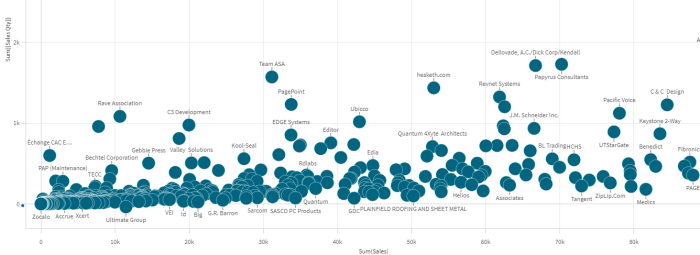
Tired of thin bars in continuous mode? Say no more, the bar chart is now getting options for the continuous axis. By specifying the unit of the data values, the bars can now represent years, quarters or any other numeric width.

Building on recent updates, Data Flow in Qlik Cloud Analytics now offers faster ways to troubleshoot, navigate, and configure your data flows:
Loading and preparing data with Data flow

Previously, limiting access to URLs or paths that Direct Access gateway could access when using the REST (via Direct Access gateway) or File (via Direct Access gateway) connectors required manual editing of configuration files. Now, the user experience has been enhanced to let you create Allow Lists for these two connectors directly from the Administration activity center in your Qlik Cloud tenant. This capability is also supported via the Public API.
Qlik Cloud Government customers can now address their enterprise reporting, or burst report distribution, requirements with a full suite of advanced reporting capabilities. Author highly formatted reports to suit recipients needs—from tabular data to pixel-perfect presentation and embedded email HTML analytic summaries. Manage tasks, recipients lists and filters within the source application and schedule report delivery to any recipient!
In-app reporting with Qlik Cloud Analytics
Note: Now supported in Qlik Cloud Government. Now supported in Qlik Cloud Government – DoD.
With this release, we are introducing a new connector for customers to use when sourcing data from SAP applications. SAP has implemented restrictions on their customers in the technologies that can be used to source and extract data from SAP applications. While Qlik will continue to support all existing source endpoints, we have introduced an “SAP compliant” endpoint for customers. This new SAP OData source connector will use a secure web service connection to extract data from SAP applications.
Customers who are using Qlik Data Gateway – Data Movement need to upgrade to 2025.5.22 or later to benefit from these improvements. For upgrade instructions and a list of resolved issues, see Upgrading the Data Movement gateway installation.
Databricks primary key support
From this version, the data task will create a primary key on target Databricks Delta tables, using the RELY keyword. Although Databricks does not enforce primary key constraints, primary keys with the RELY keyword are assumed to have no duplicates and can therefore be used by Databricks for query optimization.
Requirements:
Data type enhancements
PostgreSQL-based source: Partitioned tables now supported by default
Replication (Full Load and CDC) of partitions and sub-partitions (and sub-sub partitions) from PostgreSQLbased data sources is now supported by default.
Google Cloud BigQuery target: Support for data truncation error handling
The Google Cloud BigQuery target now supports data truncation error handling. If a data truncation error occurs, you can now choose whether to log the record to the exceptions control table (default), ignore the record, suspend the table, or stop the task.
Newly supported versions
The following source and target endpoint versions are now supported:
Newly supported driver versions
IBM Data Server Client 11.5.9 is now supported for the following DB2 sources:
End-of-life source and driver versions
……. … ………… ….
Any questions please contact our consultants. Responding in one working day.