- Home
- /
- Qlik Cloud February 2026: what’s new
 Reading time: 20 min
In this update, we explore the latest innovations across AI, analytics, automation, data integration, governance, and administration in Qlik Cloud and Qlik Talend Cloud.
This release introduces powerful new AI capabilities with the Qlik MCP Server, deeper integration with tools like ChatGPT and Claude, enhancements to Qlik Answers, expanded Data Products and Data Quality features, bias detection in Qlik Predict, improved automation capabilities, unified administration, performance controls, and much more. From smarter AI-driven insights to enhanced governance, security, and scalability — this release helps organizations unlock more value from trusted data while maintaining full control.
The Aggregate processor in Data Flow now includes additional aggregation operations, expanding the range of analytical scenarios supported when summarizing datasets without requiring script.
New operations include: First, Last, Minimum string, Maximum string, Median, Percentile, and Standard deviation.

You can now set the background and foreground color of the top bar, perfect for styling.

In-region models have been updated for the legacy Qlik Answers experience. For optimal performance, try the agentic Qlik Answers experience by activating cross-regional data processing.
Data Products and Data Quality are now available in Qlik Talend Cloud Premium, Qlik Cloud Analytics Premium, Qlik Cloud Analytics Enterprise, and Qlik Sense Enterprise SaaS (capacity-based and user-based subscriptions). With this update, trusted data products can be accessed and used directly within analytics workflows.
Data products and data quality features within Analytics
New entry points are now available in the Analytics Activity Center, providing faster access to trusted data products:
Seamless data consumption across analytics workflows
Analytics users can now easily use data products and datasets when creating new analytics assets, including applications, data preparation assets (scripts, data flows or table recipes) and ML experiments. This enables a seamless transition from data discovery to actionable insights with just a few clicks.
Unified data browsing experience
A renewed and unified Select Data dialog is now available across analytics workflows, surfacing data products, the data marketplace, the Qlik Trust Score™, and data quality indicators, helping users select data with confidence.

As of today you can enrich your dashboards by embedding images in the new Text object. Images can be selected from the media library. Images can be resized and aligned.
Five new functions are available in the Qlik analytics engine, helping to simplify load scripts and align to common functions present in other popular languages.
These functions can be used in load scripts and chart expressions.
Finding and managing assets just got easier with two new features:
A new Resource context menu to keep things tidy and consistent. Menu layouts, especially for feature-rich resources like applications, have been reorganized to reduce cognitive load, and labels have been clarified to make actions easier to distinguish.
The new Details panel is now with you at all times. Display metadata at a glance, so you can understand assets without opening them, helping you find the right content faster. You can find it in the new resource context menu as Details.
The result: fewer clicks, faster decisions, and a more efficient workflow.
The App Analyzer now has a sheet dedicated to show how and where deprecated charts are being used on your tenant in Qlik Cloud. The App Analyzer is based on usage events rather than scanning every app. Use the App Analyzer to find which apps and sheets have charts that need to be updated to newer, more modern alternatives. The easiest way to install and update the Qlik Cloud Monitoring Apps is to use the automation template. If you already have the App Analyzer, just remove the automation and install a new one to get the latest version.
Qlik Predict now surfaces bias signals during model training so you can identify data and feature patterns that may lead to unfair or unreliable predictions, before you deploy your model.
Choose which features to evaluate, then review clear flags and metrics directly in the training summary. Insights include signals such as imbalanced groups and potential proxy features, helping you validate whether a feature may be acting as a stand-in for sensitive attributes.
Qlik Predict bias detection does not automatically modify your data, features, or model. It only reports detected signals, so you can decide what action—if any—to take before deployment.
Detecting bias in machine learning models
All reloads, including those triggered from the script editor, now receive their own dedicated engine during processing. This enhancement applies to both small and large apps, providing a more consistent and predictable experience for all users, particularly app developers.
Note: Now supported in Qlik Cloud Government. Now supported in Qlik Cloud Government – DoD.
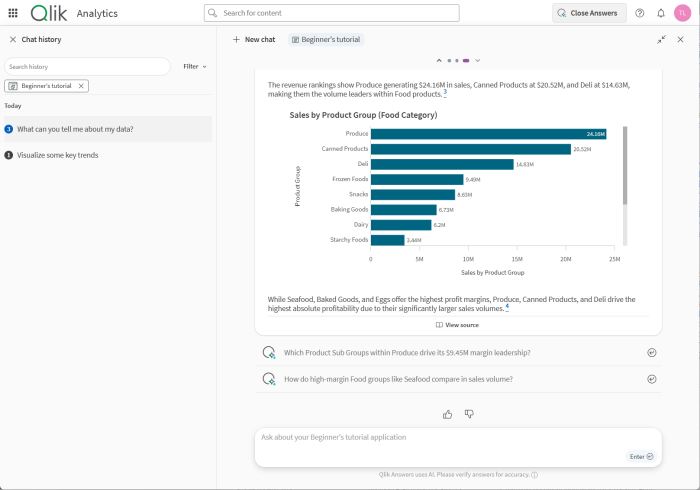
Qlik Answers now brings together the reasoning power of frontier LLMs, the Qlik associative engine, and our powerful unstructured knowledge bases into one unified experience through agentic AI.
Access through your applications to gather insights or create charts. Create and access through your assistants to bring together structured and unstructured insights.
The Qlik product help agent will always be there to help you get the most out of the platform.
Get started by turning on AI Features in Administration > Settings.
Note: Not supported in Qlik Cloud Government – DoD. Not supported in Qlik Cloud Government.
Enabling cross-region data processing
Note: The Direct Access gateway installer might take slightly longer to start when compared to previous versions. This is due to additional mandatory security checks introduced in this version, and is completely normal.
Direct Access gateway 1.7.11 introduces both new and enhanced features, and resolves several issues. For upgrade instructions and a list of resolved issues, see Upgrading the Direct Access gateway installation
ODBC (via Direct Access gateway) connector enhancements
Newly exposed configuration settings
The following settings, which previously could only be figured by manually editing a configuration file have now been exposed in the Gateway settings for <gateway-name>dialog:
Support for delimiting table names
Some data sources require table names with upper case letters or special characters to be delimited in the load script. Otherwise, an error will occur. The new Delimit table names option eliminates the need to manually add delimiters to the load script when loading or previewing data.
For details, see Create an ODBC (via Direct Access gateway) connection.
Exposing the parameter for getting detailed error messages when using ODBC sources
Due to security concerns, the default error message returned by the ODBC driver contains minimal information. However, in certain scenarios, you might need more information to troubleshoot a specific issue. Previously this required adding the ShowErrorDetailMessageproperty to the Advanced section in the connector dialog and setting it to True. Now, you can select the Show detailed error message check box in the Gateway settings dialog.
For details, see Show detailed error message.
Support for changing the process isolation settings without restarting the gateway service
In previous versions, any changes to process isolation settings such as increasing the number of processes during a reload required the gateway service to be restarted. Now, changes to these settings will be applied without needing to restart the gateway service.
Logging improvements
Enhanced async command support
Async command support increases efficiency by enabling Direct Access gateway to handle multiple commands (requests) simultaneously, as opposed to one at a time. In the past, when the destination command pod on Qlik Cloud was not available to handle a request, Direct Access gateway would continue sending the request to the same pod instead of failing. This would cause the command to fail after 10 attempts, with a generic error instead of pointing to the actual cause of the failure.
Qlik telemetry
A UserAgent header has been added to all connector-agent command responses (via HTTP POST). This will improve tagging of Direct access gateway usage in Qlik telemetry.
Header format:
qlik-direct-access-gateway/version
Example:
qlik-direct-access-gateway/1.7.10
Use trusted Qlik data directly in your favorite AI tools (such as Claude and ChatGPT) — with the same governance and Section Access you use today.
Your AI can now find the right application and data in your tenant, then let Qlik handle the calculations in engine so responses stay grounded in your trusted data.
Qlik MCP server is supported for Qlik Cloud Government and Qlik Cloud Government – DoD.
To get started (Tenant Admin required for first connection):
Enabling cross-region data processing

We’ve introduced a set of small but meaningful UI improvements in the embedded scheduler, designed to make the experience simpler, clearer, and more intuitive for everyone.
These updates focus on aligning terminology, labels, and actions across the scheduler interface, helping users more easily understand what each option does and how to work with scheduled tasks. While the functional behavior remains the same, the refined wording and button naming reduce ambiguity and lower the learning curve—especially for new users.
The changes released today include:
Beyond immediate usability benefits, these refinements also lay important groundwork for upcoming enhancements, including the future global task monitoring capability. By establishing clearer and more consistent concepts now, we’re ensuring that new capabilities can be introduced in a way that feels natural and familiar.
Overall, this update is about simplicity first: clearer language, more intuitive actions, and a smoother experience when working with scheduled tasks—today and as the platform continues to evolve.
Scheduling data refreshes with tasks

It’s now possible for the app developer to pin important fields to the selection bar for easy access. No need any longer to duplicate filter panes on every sheet for frequently used dimensions like Year, Quarter and Month. Add and remove fields using the fields or master dimension panel. The pinned fields are only visible in the common selection bar on desktop, not in the global selector tool or the mobile list view.
Adding fields to the selections bar

Qlik Open Lakehouse now supports high-throughput streaming ingestion, allowing you to land millions of events per second from Apache Kafka, Amazon Kinesis, and Amazon S3 directly into optimized Apache Iceberg tables in your own AWS environment.
What’s new:
Three new streaming source connectors: Kafka, Amazon Kinesis, and Amazon S3, with support for JSON, Avro, Parquet, CSV, and more.
Two new task types:

For more information, see Connecting to data streams and Streaming data.
Note: Not supported in Qlik Cloud Government. Not supported in Qlik Cloud Government – DoD.
Qlik Open Lakehouse projects now support mirroring data to Amazon Redshift, expanding the data mirror feature to enable multi-platform analytics from a single project. In addition to existing targets such as Snowflake, Redshift is now available as a mirror target, allowing one dataset to be queried from one or more cloud data warehouses.
With mirror tasks, Qlik enables multi-platform data pipelines without data duplication. You can query data stored in Iceberg tables in your lakehouse directly from Redshift, eliminating the need for additional storage while maintaining consistent, up-to-date data access.
This enhancement also supports a Medallion architecture approach:
Redshift users can query lakehouse data as if it were native to the warehouse, while Qlikautomatically handles data refresh, performance optimization, and storage management.
The result is greater flexibility, lower storage costs, and unified analytics across multiple cloud data platforms, now including Redshift.

For more information, see Mirroring data to a cloud data warehouse.
Note: Not supported in Qlik Cloud Government. Not supported in Qlik Cloud Government – DoD.
You can now document data products using a rich markdown editor, enabling clear, structured, and link-enhanced readmes that help consumers quickly assess suitability and usage. Existing readmes are seamlessly supported, and exported documentation now includes the fully formatted readme.
Unlock the power of real-time data integration with our Kafka target connector. Effortlessly replicate your data from any supported source directly into on-premises Apache Kafka or Amazon MSK, ensuring reliable, fault-tolerant transfers that keep your applications agile and informed. Whether you’re maintaining data consistency across systems or fueling analytics, this connector delivers low-latency replication with minimal setup.
Note. Replicating to Kafka on-premises requires Data Movement gateway 2025.5.40 or later. Replicating to Amazon MSK only requires Data Movement gateway 2025.5.40 or later if it cannot be accessed directly from Qlik Cloud (for example, if it’s located in a VPC).
Setting up Data Movement gateway
When rare issues require deeper insight, Qlik Support might ask you to set the task logging to Trace or Verbose. Parts of the log file containing sensitive information will then be automatically encrypted. You can share these log files confidently with Qlik Support, knowing your data remains protected. Need Support to analyze encrypted sections? Just provide the secure decryption key on request. Enhanced privacy meets faster resolution — troubleshooting has never been safer.
Sharing encrypted log files with Qlik Support
……. … ………… ….
Any questions please contact our consultants. Responding in one working day.