- Home
- /
- Qlik Cloud March 2026: what’s new
 Reading time: 20 min
Welcome to the March release highlights for Qlik Cloud. In this video, you’ll discover the latest updates designed to improve productivity, usability, and analytics capabilities across the platform. From enhanced monitoring and automation improvements to AI-powered insights and UI customization, this release brings powerful new features to help you work smarter and faster.
DATA ANALYTICS
Header and content cell styling in straight tables
You can now style the background and text color of column header and content cells separately in your straight tables.
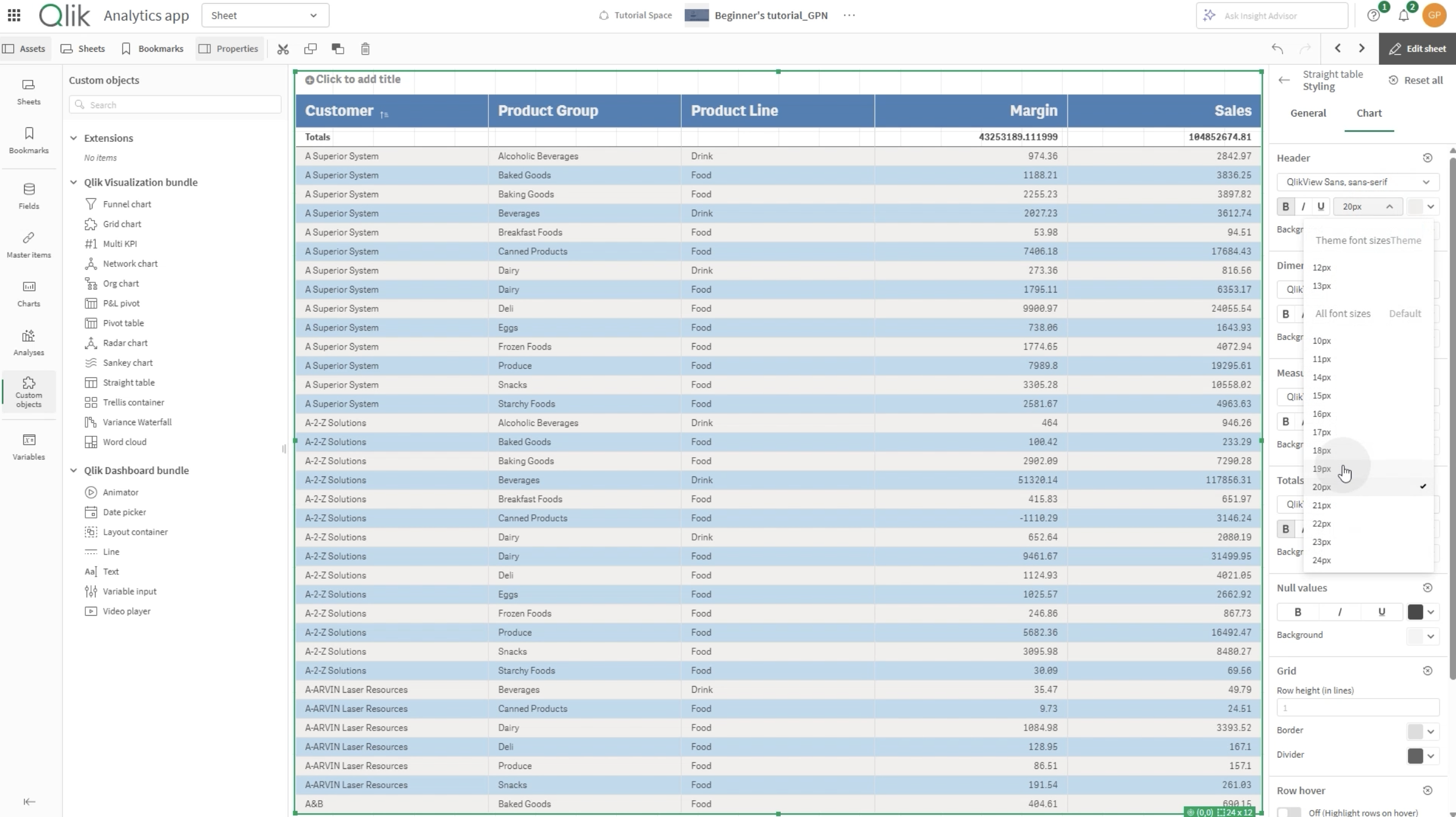
UI improvements for straight table
The straight table is getting a nice shortcut to get to add arbitrary expression at creation, from 6 clicks to 3.
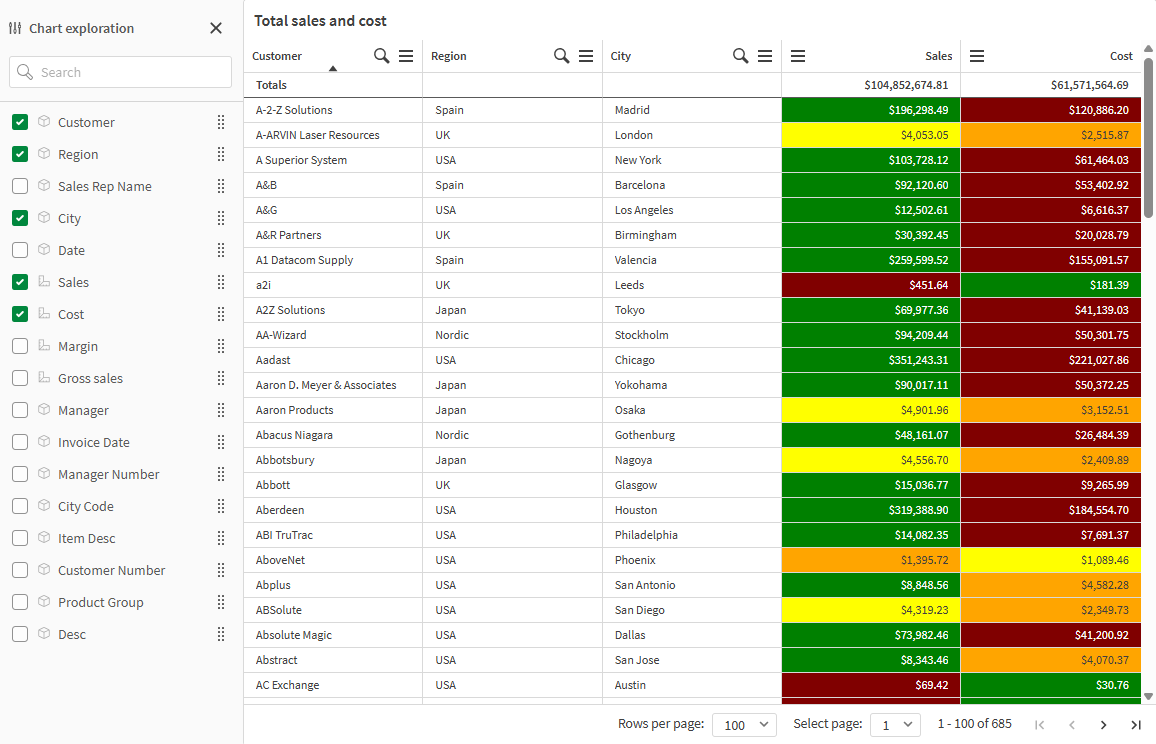
Amazon S3 V2 Connector gets optional root prefix in connection definition
The Amazon S3 V2 connector now includes an optional Root Prefix parameter. Admins can restrict a connection to a specific folder path, limiting user access and providing secure data governance without separate buckets or complex IAM policies. Users browse and select files within their assigned folder, unaware of any broader bucket content.
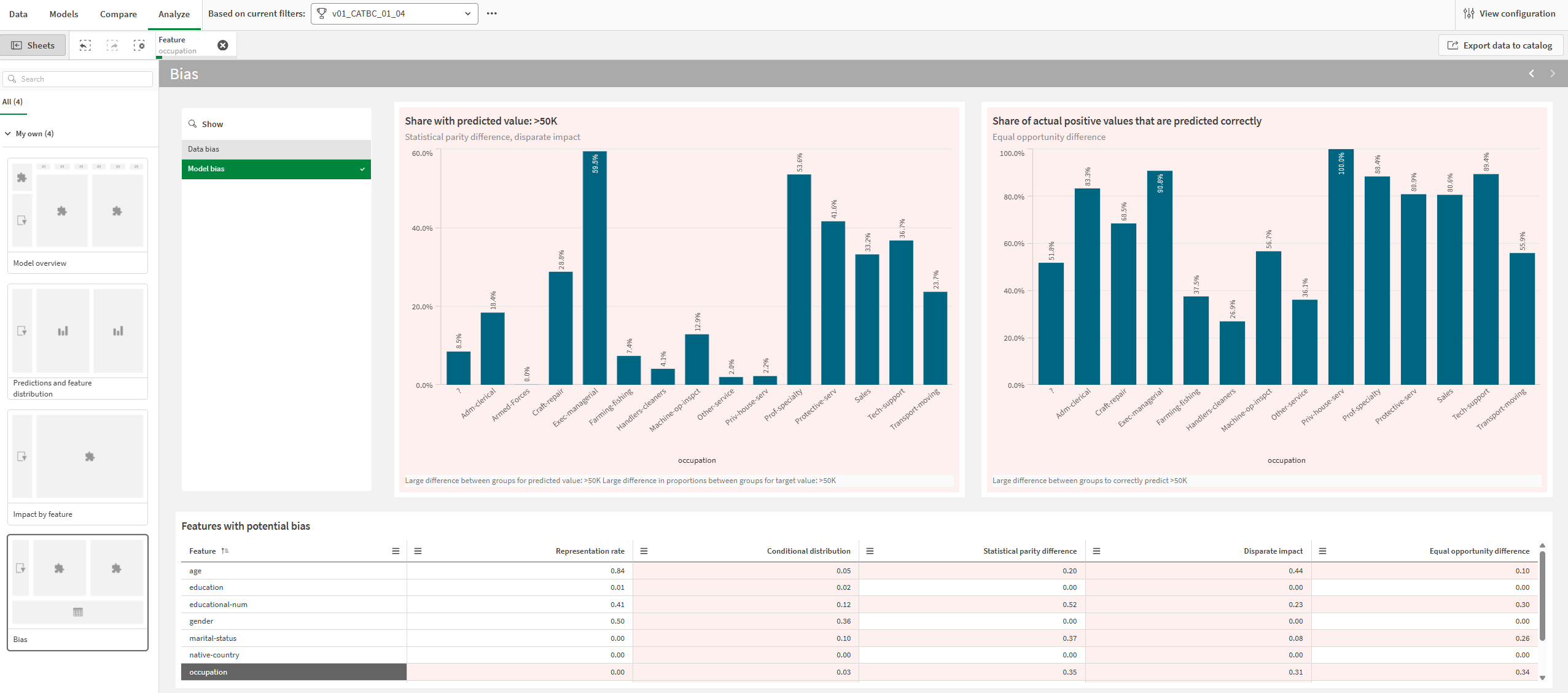
AI-recommended features for bias detection
When configuring bias detection in a Predict experiment, you can now use AI to recommend which features to include in your bias scan. The AI analyzes feature names and data samples to identify features that may be relevant for bias analysis, such as those related to age, gender, ethnicity, or other sensitive attributes.
Recommended features are pre-selected for your review. You can adjust the selections before running your experiment, and manual feature selection remains available for bias detection.
This feature uses AI and can make mistakes. Review all recommendations before running your experiment.
Prerequisites: AI Features in Qlik must be enabled by your tenant administrator.
Using generative AI to recommend features for bias detection
Note: Not supported in Qlik Cloud Government. Not supported in Qlik Cloud Government – DoD.
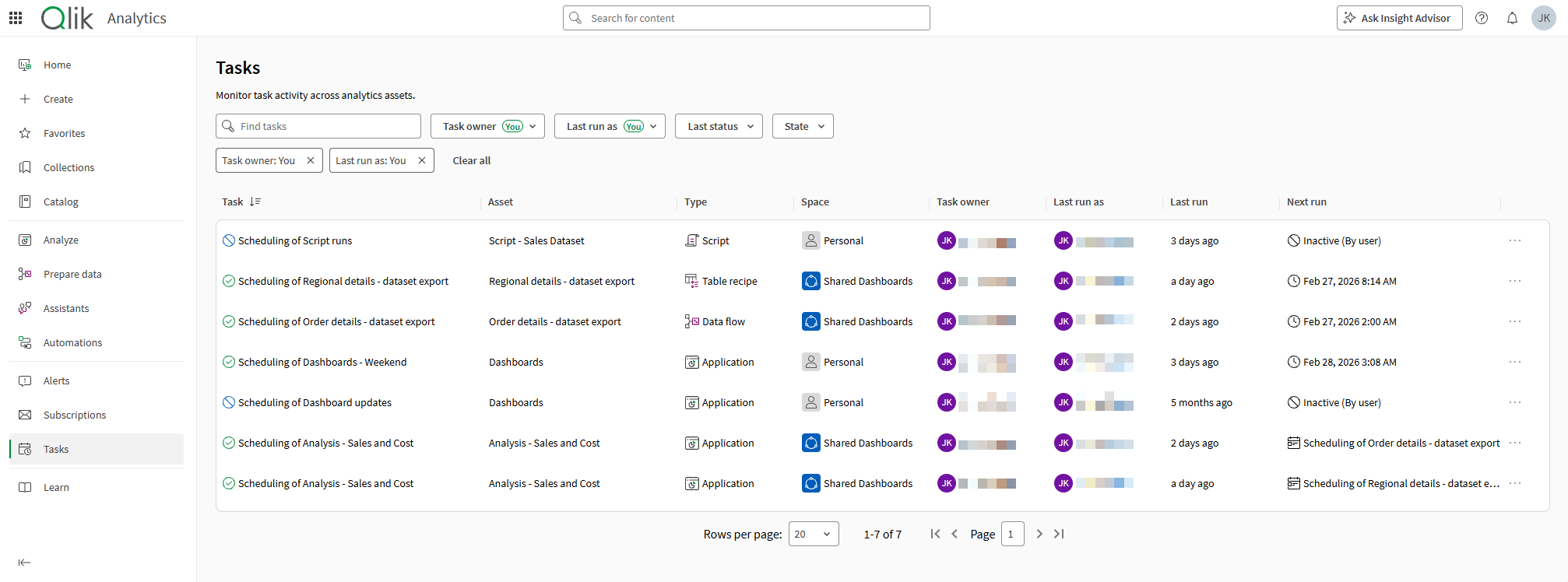
What’s New: Global Task Monitoring in Qlik Cloud
Keeping your data pipelines running smoothly just got a lot easier. We’re introducing Global Task Monitoring in Qlik Cloud—a long-awaited capability that gives you a centralized view of task activity across your entire tenant.
With this new monitoring experience, you can quickly analyze historical task runs, identify failures, and understand where an issue occurred, all directly within your Qlik Cloud environment. Instead of relying on external tools or navigating across multiple views, you now have a single place to monitor the health and status of your tasks and task chains.
This release focuses on giving you clear visibility and faster troubleshooting, helping teams detect issues earlier and keep data workflows running reliably.
But we’re just getting started.
We’re already working on enhancements that will take this experience further, including:
While there’s more to come, we’re excited to deliver this foundational capability today. Global Task Monitoring brings operational visibility directly into Qlik Cloud, helping you stay in control of your data tasks without leaving the platform.
Monitoring tasks for refreshing data
Application changes for Qlik Answers
As part of ongoing improvements to Qlik Answers assistants and indexing, applications must now be explicitly activated for Qlik Answers before they can be added to an assistant. Only activated applications will appear in the “Add application” flow.
In the Administration activity center, application management has been enhanced. Under the Content section, administrators can now view and manage applications enabled for Qlik Answers directly from the Applications tab.
A new Source filter option has been introduced to help identify applications by activation status. The filter includes “Activated for Qlik Answers,” allowing administrators to quickly see which applications are indexed and contributing to Qlik Answers assistants.
Administrators can also deactivate applications directly from the same view, either in bulk—by selecting multiple applications and choosing “Deactivate Qlik Answers”—or individually via the actions menu on each application. When an application is deactivated, it is removed from the Qlik Answers index but not deleted, and it can be reactivated at any time.
In addition, indexing visibility has been enhanced for Qlik Answers applications. When an application is being indexed, administrators can now view detailed real-time progress through an improved Indexing status dialog. By selecting “View progress,” they can see each step of the indexing process, with checkmarks for completed steps, spinners for ongoing tasks, and percentage indicators for longer operations. This provides clear insight into where the process is and helps estimate remaining time.
Managing applications with Qlik Answers
Discovery Agent: Turn Data Changes Into Actionable Insights
The Discovery Agent automatically monitors your analytics applications and delivers AI-powered trend insights directly to your feed—eliminating the need to hunt for patterns across multiple dashboards. Using intelligent anomaly and outlier detection, it surfaces significant changes as they happen, making advanced trend analysis accessible to all business users. Whether you’re an executive tracking critical KPIs like sales and margins, a business analyst monitoring global market performance, or a sales leader identifying revenue opportunities, the Discovery Agent keeps you informed of what matters most. Insights are generated automatically with each data refresh, and users can explore findings even further using Qlik Answers generative AI.
Note: Not supported in Qlik Cloud Government. Not supported in Qlik Cloud Government – DoD.
Updates to the Share >Embed menu
We’ve updated the Share > Embed menu to bring you qlik-embed, our current embedding framework, allowing easy embedding of visualizations from your Qlik Sense application. This improvement also adds easy-to-copy app ID, object ID, and visualization type metadata into the pane.
Embedding a visualization or a sheet in a web page
Keyboard shortcuts for Analytics Applications
We’ve introduced new keyboard shortcuts to make navigating Qlik applications faster and more efficient. You can now quickly move between key tools, such as the Data Load Editor, Reporting, and Sheets, without leaving your keyboard.
These shortcuts streamline common workflows, helping you access the areas you use most with fewer clicks and less interruption. Whether you’re building data models, designing reports, or exploring insights on sheets, switching between tools is now quicker and more seamless than ever.
Keyboard navigation and shortcuts
Large training datasets for Qlik Predict
Qlik Predict is expanding training support to enable training on much larger datasets, helping you build more accurate predictive models.
Training capacity is based on your subscription and is measured in cells: rows × selected columns (including the target field). Depending on your subscription and dataset format, training datasets can be up to 500M cells.
Supported dataset file types: QVD, Parquet, and CSV. For very large datasets, preview/profile details may be limited depending on the file type.
Dataset size limits for training
Configurable preview size
The preview size can now be configured to 100 or 1,000 rows, giving you deeper visibility into data quality issues across a larger slice of your data, enhancing the data preview filtering experience in the meantime.
What’s available
This release extends the dataset preview filtering capability with a new preview size option:
The existing filtering capabilities remain fully available, including filtering by specific validation rules or semantic type results, and viewing the indicators that identify which rule or semantic type triggered an invalid status.
Why this matters
Working with a larger preview reduces the risk of missing edge cases that only appear beyond the first 100 rows. Data engineers and quality leads can now catch a wider range of data quality issues in a single preview session, making validation rule tuning and remediation decisions faster and more reliable.
Filter valid, empty, and invalid records from dataset preview
The data preview now supports filtering rows by quality status. This update helps users quickly isolate and understand records that fail validation rules or semantic type checks from the dataset preview, over a 100-rows sample.
With this enhanced preview, you can:
This improvement enhances the data quality assessment workflow for data engineers, product managers, and quality leads. For example, a data product manager can now preview invalid addresses or missing customer IDs to decide if remediation is needed, while a data quality manager can validate the effectiveness of applied rules in real time.
Filtering is currently available over the 100-row dataset preview, with support for a 1,000-row preview coming soon to provide even deeper validation visibility.
Validation rules now visible from the dataset overview
Validation rule results are now surfaced directly on the dataset overview, giving data producers and consumers immediate visibility into data quality issues without leaving the dataset’s front door.
What’s available
This release introduces two new additions to the dataset overview:
Why this matters
By bringing validation rule status directly into the dataset overview, data producers and consumers can now understand quality issues in context, act earlier, and with greater confidence. This update improves explainability of the Qlik Trust Score™, shortens time-to-insight, and enables more targeted remediation, all from a single, unified entry point.
Scope-based access control across Qlik Cloud
This release introduces scope-based access control across Qlik Cloud, giving tenant administrators a new layer of control over feature and API access at the user level: they can now precisely control which users can access which capabilities.
Each scope maps to a specific workflow, such as creating an analytics app, making it straightforward to grant or restrict access based on what a user actually needs to do.
For administrators, scopes are visible and assignable directly in the Management Console. For end users, the UI now reflects actual permissions, reducing confusion around unavailable actions.
Permissions in User Default and custom roles
Qlik Talend Cloud Data Integration improvements
Customers who are using Qlik Data Gateway – Data Movement need to upgrade to 2025.11.23 or later to benefit from these improvements. For upgrade instructions and a list of resolved issues, see Upgrading the Data Movement gateway installation.
Extended Parallel Load support
The Parallel Load feature now supports Databricks target.
Replicating dataset segments in parallel
DDL History control table: Newly supported targets
The attrep_ddl_history (DDL History) control table contains a history of DDL changes that occurred on the source during replication to the target.
The following target endpoints are now supported:
Enhancement to the “[header]__change_mask” header column
When using Change Tables with Parquet format, the header column [header]__change_masknow pads zeros to the left (instead of the right), to align with the little endian rule of storing bytes in reverse order.
Affected target endpoints:
Newly supported data source and target versions
Newly supported driver versions
End-of-life for Microsoft Azure Database for MySQL and Microsoft Azure Database for PostgreSQL
Support for Microsoft Azure Database for MySQL and Microsoft Azure Database for PostgreSQL, which have been officially retired by Microsoft, has been discontinued.
End-of-life data source and target versions
End-of-life driver versions
……. … ………… ….
Any questions please contact our consultants. Responding in one working day.